Ever feel like your most important emails just disappear into a black hole? You hit send, wait... and get nothing but silence. It’s a frustratingly common experience, especially when you realize the average professional is drowning in over 120 emails every single day. Your message isn't just a message; it's one voice trying to be heard in a very, very crowded room.
Most people think their emails get ignored for simple reasons, like sending to the wrong address. But the real culprits are usually hiding in plain sight: robotic language, a fuzzy purpose, and those dreaded walls of text. To write an email that actually gets a response, you have to get inside your reader's head.
The Four Pillars of an Email That Gets Read
Breaking through all that noise isn't about luck; it's about strategy. Before you even think about typing, stop and ask yourself one critical question: “What, exactly, do I want this person to do after reading this?” That single, simple gut-check is the foundation for everything else. It defines your email's entire reason for being.
From there, every effective business email is built on four core pillars.
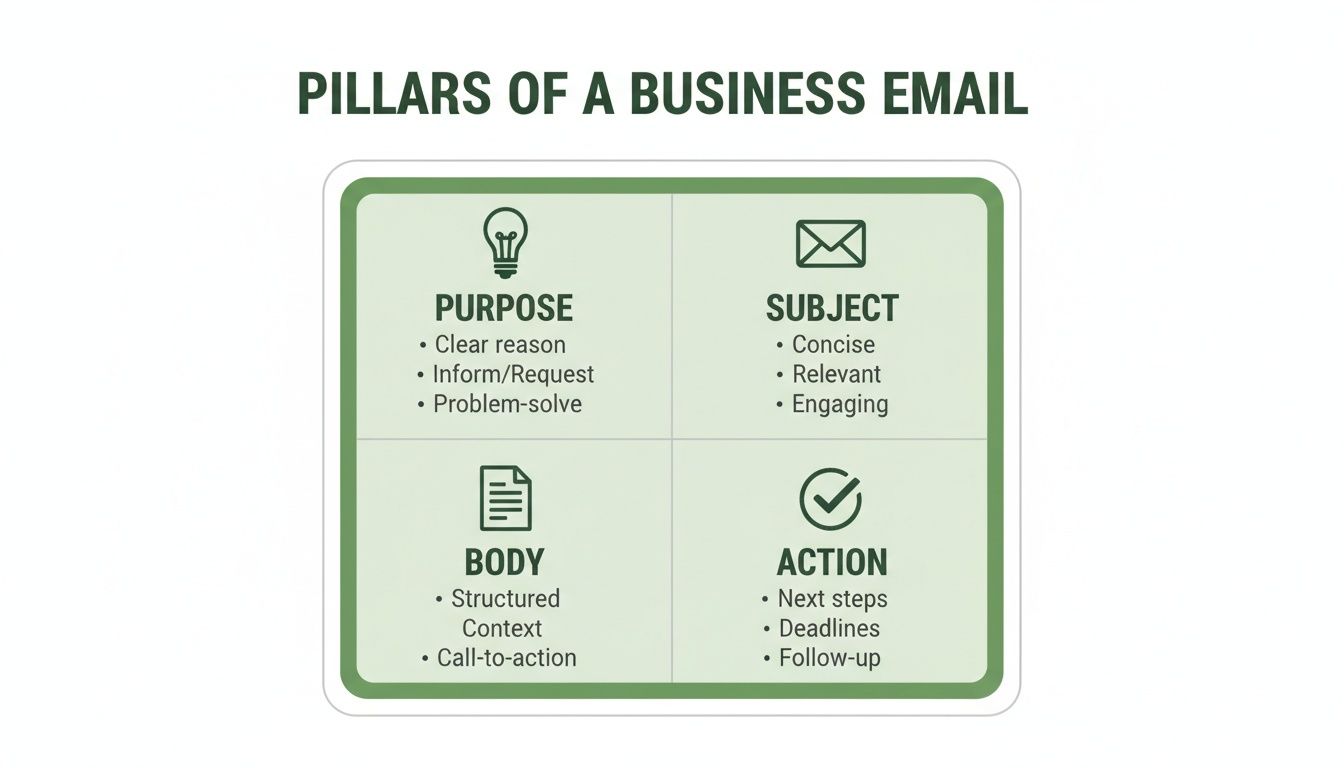
This structure isn't just a formula; it's a framework for clear communication. Each piece supports the others to create a message that's professional, respectful of the reader's time, and built to get results.
Think of it like this: people are busy. They instinctively prioritize emails that are relevant, easy to understand, and simple to act on. An email without a clear next step is just informational noise. But an email with a specific ask? That’s a tool for getting things done.
To give you a quick overview, here are the four pillars we'll be diving into.
The Four Pillars of an Effective Business Email
This table summarizes the core components we'll break down in the next sections.
| Pillar | Objective | Key Action |
|---|---|---|
| Purpose | To define a clear goal for the email. | Answer: "What do I want the reader to do?" |
| Subject | To grab attention and convey relevance. | Write a short, specific, and descriptive line. |
| Body | To deliver the message quickly and clearly. | Keep it scannable with short paragraphs and lists. |
| Action | To guide the reader toward the next step. | State exactly what you need from them. |
Mastering these four elements is the difference between an email that gets archived and one that gets a reply.
Winning the Inbox Battle
The fight for attention is real. With business pros getting an average of 121 emails per day, your subject line is your one shot to make a good first impression. It’s not just about what you say, but when you say it. Data often shows that Tuesday and Thursday around 10 AM are prime time for sending, catching people when they're most focused.
The stakes get even higher when you consider mobile. A massive 81% of professionals check their email on their phones first. If your message isn't formatted for a small screen, it’s doomed. In fact, a staggering 42.3% of users will delete an email immediately if it doesn’t look right on mobile. You can find more deep-dive stats on email engagement over at DragApp.com.
In the sections that follow, we’ll unpack the practical strategies for building emails that people don't just open, but actually read and act on. It’s time to turn your emails from a daily chore into one of your most powerful professional tools.
Writing Subject Lines That Get Opened
Your subject line is the gatekeeper of your entire email. Think about it—in a sea of unread messages, it’s the one thing that has to convince someone to click. It’s a make-or-break moment.
We're not just guessing here. Research shows that a whopping 47% of people decide whether to open an email based on the subject line alone. That single line carries all the weight of your first impression. If it’s vague, boring, or sounds like spam, your email is going straight to the trash, unread.
The trick is to find that sweet spot between being clear and making them curious. You need to give them just enough information to know what it's about, but also a reason to want to know more.
Be Specific and Action-Oriented
Nothing kills an email's chances faster than a lazy subject line. Things like "Quick Question," "Checking In," or "Update" are dead on arrival. They put all the work on the recipient to figure out what you need, and a busy person will just archive it for "later"—which usually means never.
Get straight to the point. Be direct about what's inside and what you’re hoping for. It shows you respect their time and sets the right expectations from the get-go.
Just look at the difference:
Instead of: Meeting Request
Try: Meeting Request: Q3 Marketing Strategy Sync on Thursday
Instead of: Follow-up
Try: Following up on our call about the project proposal
Instead of: An idea
Try: Idea for improving our weekly reporting process
See how that specificity instantly tells them what's what? They know the topic, who it might involve, and why it matters to them, all before they even open the email.
Create Urgency Without Being Spammy
Urgency can be a great motivator, but you have to handle it with care. Subject lines that look like "URGENT ACTION REQUIRED!!!" are more likely to get flagged by spam filters than they are to get a quick response.
The goal is to create a genuine sense of timeliness, not a fake fire drill.
A much better way to do this is by weaving in deadlines or time-sensitive details. It adds a little bit of natural pressure that encourages people to open it sooner rather than later, without sounding like you're panicking.
Pro Tip: Keep it short. More than half of all emails are now opened on a phone, where a subject line longer than 50 characters will get cut off. I always aim for 6-8 words to make sure the whole thing is visible on any screen.
For a deeper dive into crafting effective subject lines, check out our guide on email subject line best practices for more advanced techniques.
Personalize and Pique Curiosity
A little personalization can make your email stand out from the crowd. Simply including the person's name, mentioning a mutual connection, or referencing a project you're both working on can do wonders for your open rate. It immediately changes the feel from a mass email to a one-on-one conversation.
Curiosity is your other best friend here. A good question or a hint at some valuable info can be almost impossible to ignore. This works especially well when you have some kind of existing relationship or a really compelling, relevant hook.
Here’s how you can mix these two ingredients:
- Networking: "John Doe suggested I connect with you"
- Follow-Up: "Quick question about your thoughts on the new design"
- Sales/Outreach: "Loved your recent article on content marketing"
These subject lines don't feel like an interruption. They feel like the start of a real conversation, showing you've done your homework and have a good reason for being in their inbox. That's a core piece of learning how to write a business email that people actually want to read.
Structuring Your Email Body for Readability
So, your killer subject line worked—they opened the email. Now the real test begins. You have just a few seconds to prove your message isn't a waste of their time. A giant wall of text is the fastest way to get your email ignored, archived, or deleted.
How you structure the body of your email is just as critical as the words you choose. Good structure creates a clear path for the reader, guiding them from your opening line right to your call to action.
The goal? Make your point so easy to digest that someone can get the gist in under 30 seconds while glancing at their phone between meetings.
Start with the Essentials
Every great business email follows a simple, effective framework that puts the reader's time first. It's not about being rigid; it's about a logical flow that gets right to the point without sounding abrupt.
- Open with a quick, human touch. A simple "Hope you're having a great week" or "It was great connecting at the conference last week" works perfectly.
- State your purpose immediately. The very next sentence should answer the question: "Why am I getting this email?" Don't bury your reason for writing.
- Keep the details brief. Use short paragraphs or bullet points to lay out any necessary background information.
- End with a clear next step. Make it crystal clear what you need from them.
This "front-loading" approach means that even if they only skim the first few lines, they'll know exactly what your email is about.
Design for Skimming, Not Reading
Let’s be honest: people don't read their work emails. They scan them, looking for keywords, action items, and reasons to move on. Your formatting can either make that easy or impossible. Long, unbroken paragraphs are a reader's worst enemy.
Instead, you need to create visual breaks that make the content scannable.
Think about the sheer volume of messages people handle. A recent study found 86% of professionals rely on email for business, sifting through an average of 121 messages daily. With 75% of users checking email on their smartphones, a poorly formatted message is a huge liability—nearly 42.3% of non-optimized emails get deleted instantly. You can explore more of these email engagement trends to see why human-friendly formatting is so essential.
Short paragraphs are your secret weapon here. Stick to one main idea per paragraph, and keep them to just one to three sentences. This adds white space, making your message feel less daunting and way easier to process on a small screen.
Use Formatting to Guide the Eye
Smart formatting acts like a set of highlighters, drawing attention to the most important parts of your message. Think of bold text and bullet points as your signposts on the road to getting a response.
Bold Key Information
Use bolding strategically to make critical details pop. It’s perfect for things like deadlines, names, specific questions, or key takeaways. This helps a busy reader quickly pinpoint what truly matters.
For example, a dense sentence can be made instantly clearer:
"Could you please review the attached Q3 performance report, specifically the data on page 5, and provide your feedback by end of day this Friday, October 25th?"
Break Down Complexity with Lists
Whenever you have multiple questions, a list of items, or a sequence of steps, use a bulleted or numbered list. This is one of the easiest ways to turn a confusing block of text into a simple, organized checklist.
Take this feedback request, for instance:
"Hi Alex,
Great work on the initial draft of the client proposal. I have just a few points of feedback:
- Could you add the updated sales figures to slide 4?
- Let’s rephrase the project timeline on slide 7 for clarity.
- Please double-check the client's name spelling on the title page.
Let me know if you can have these changes done by 3 PM today. Thanks!"
This structure is instantly scannable and actionable. Alex knows exactly what to do without having to reread a long paragraph three times.
Getting the Tone and Your Call to Action Right
If the structure of your email is the skeleton, its tone is the personality. It’s what makes the difference between your message being welcomed or ignored. Getting the tone right builds an instant connection, while a misstep can shut a conversation down before it even has a chance to start.
Think of it as a sliding scale. At one end, you have the formal language needed for a cold pitch to a CEO. At the other, the casual, emoji-filled chat you have with a coworker you know well. Your job is to know exactly where to land on that scale based on who you're talking to and why.
Beyond just the words you choose, mastering professional email etiquette is what builds the trust that gets your emails opened and acted upon.
Finding That Perfect Professional Tone
Figuring out the right tone isn't a science; it’s an art. The most common mistake I see is people defaulting to a stuffy, corporate voice that sounds like a robot wrote it. The second biggest mistake? Being way too casual with someone you just met, which can come off as unprofessional.
The sweet spot is sounding like a competent, friendly human being.
Let’s look at a few common situations:
- First time emailing a potential client: Stick to a formal but warm approach. "Dear [Name]," is a solid start, and signing off with "Sincerely," or "Best regards," works perfectly.
- Sending a team-wide update: You can relax a bit here. "Hi Team," is great, and a simple "Thanks," is all you need for a closing.
- Following up with a vendor you know: You’ve already got a rapport, so a semi-informal tone is fine. "Hi [First Name]," strikes the right balance between friendly and professional.
When in doubt, always start a little more formally. It’s much easier to dial it down than to try and recover from being too casual. A great tip is to mirror the tone of their reply—it’s a subtle way to build rapport.
Crafting a Powerful Call to Action
Once you've set the right tone, it's time for the most critical part of your email: the Call to Action (CTA). This is why you hit "send" in the first place. An email without a clear CTA is just an FYI. An email with one gets things done.
This is where so many emails fall flat. Vague sign-offs like "Let me know your thoughts" are action-killers. They’re passive and put the work on the other person to figure out what you actually need from them.
Your CTA needs to be direct, specific, and incredibly easy to act on. The reader should have zero confusion about what you want them to do next. This one change can make a massive difference in your response rate.
To write a CTA that works, you have to be explicit. If you want to dig deeper into this, our guide on what is a call to action is a great resource.
From Vague to Actionable CTAs
Let's look at a few before-and-after examples to see how we can turn a weak request into a directive that gets results.
Instead of this: "Let's connect sometime next week."
Try this: "Are you free for a 15-minute call on Tuesday or Wednesday afternoon? Feel free to book a time that works for you directly on my calendar here."
Instead of this: "Please review the attached document."
Try this: "Could you please share your feedback on the 'Key Findings' section on slides 4-7 by end of day tomorrow?"
Instead of this: "I'd love to get your input."
Try this: "What are your thoughts on option B for the new logo design?"
See the difference? The better examples are specific and make the next step effortless. This is the key to writing a business email that actually works. Think about it: business email isn't just about communication; it's a powerful tool, generating an incredible $36-$40 ROI for every $1 spent and outperforming social media by 40x when it comes to acquiring customers.
With a projected 408 billion business emails sent daily by 2027, making yours clear and actionable isn't just a good idea—it's essential for standing out and driving results.
Real-World Business Email Examples
Seeing the theory in action is where the real learning happens. You can read all the advice in the world, but looking at actual before-and-after examples is what makes the concepts click. It’s often the small tweaks—a bit of personalization here, a clearer call-to-action there—that transform a flat, robotic email into one that gets results.
Let's walk through a few common business scenarios. I'll show you the kind of generic email that often gets ignored and then a rewritten, humanized version that’s far more effective. Think of these less as templates and more as a new way of approaching your messages.
The Meeting Request
Asking for someone's time is a bigger deal than we often treat it. A vague or demanding email is an easy one to delete. Your goal is to be respectful, crystal clear about the why, and make it incredibly easy for them to say "yes."
Before: The Generic Approach
Subject: Meeting
Hi Alex,
I need to schedule a meeting with you to discuss the Q4 project. Please let me know what time works for you next week.
Thanks,
Chris
This is a classic example of making the other person do all the work. It’s too brief, provides zero context, and feels more like a command than a collaborative request. Alex has no idea what the meeting is about or why his presence is needed.
After: A Humanized Approach
Subject: Quick Chat re: Q4 Project Kickoff
Hi Alex,
Hope you’re having a productive week.
I’m putting the finishing touches on the kickoff plan for the Q4 project and would love to get your input on the proposed timeline before we present it. Your insights from the last campaign would be invaluable here.
Would you have 15 minutes for a quick call sometime next week? My calendar is up to date, so feel free to book a time that works for you here:
[Calendar Link]If none of those times work, just let me know what’s best for you.
Best,
Chris
See the difference? This version is a massive improvement. It’s personal, explains the "why," and respects Alex’s time by specifying the meeting length (15 minutes). Most importantly, it provides a frictionless way to schedule the call. You can explore more polished versions in our guide to crafting a https://naturalwrite.com/blog/professional-email-example, which breaks down even more scenarios.
The Follow-Up Email
Following up is a delicate dance. You have to be persistent without being a pest. A great follow-up adds value, provides context, and gently nudges the recipient toward the next step.
Before: The Pushy Nudge
Subject: Following Up
Hi Sarah,
Just following up on my email from last week. Have you had a chance to look at the proposal?
Let me know.
Thanks,
Mark
This just feels demanding and adds no new information. It can make the recipient feel guilty or annoyed, which is the exact opposite of what you want.
After: A Value-Add Approach
Subject: Re: The Project Proposal
Hi Sarah,
Hope your week is off to a great start.
Just wanted to circle back on the proposal I sent over last Tuesday. I know how quickly inboxes fill up, so no pressure at all. When you get a moment, I’d love to hear your initial thoughts—especially on the budget section.
On a related note, I came across this article on market trends that made me think of our conversation. Thought you might find it interesting:
[Link to Article]Let me know if any questions pop up.
Cheers,
Mark
This email is helpful, not pushy. It reminds her of the original message, narrows the focus of the request ("the budget section"), and even adds value with a relevant article. There are many great strategies to re-engage prospects via email, and this value-add approach is one of the most effective.
The Professional Apology
We all make mistakes. When things go wrong, a sincere, professional apology can not only fix the immediate problem but actually strengthen the relationship. The key is to take ownership, explain the solution, and be direct.
Before: The Vague Apology
Subject: Apology
Dear Customer,
We apologize for any inconvenience caused by the recent system outage. We are working on it.
Sincerely,
The Support Team
This is impersonal and totally misses the mark. "Any inconvenience" minimizes the customer's frustration, and the vague "we are working on it" offers zero reassurance.
After: A Sincere and Clear Apology
Subject: An Update on Today's System Outage
Hi David,
I’m writing to sincerely apologize for the service disruption you experienced earlier today. We had an unexpected server issue that caused an outage from approximately 10:00 AM to 11:30 AM EST.
Our engineering team has already identified the root cause and deployed a fix. All systems are now 100% operational. To prevent this from happening again, we're implementing additional monitoring protocols.
We know how much you rely on our service, and I am truly sorry for the frustration this caused.
Best regards,
Jessica | Head of Customer Success
This version is worlds better. It takes full responsibility, provides specific details (like the outage timeline), confirms the problem is solved, and explains what's being done to prevent it from happening again. It turns a negative experience into a chance to show you're competent and trustworthy.
Proofreading Before You Hit Send
You’ve spent time carefully crafting the perfect message. Now, what you do in the final few moments before clicking "send" is arguably the most critical part of the entire process. This isn't just about grammar; it's your last chance to catch an error that could instantly undermine your credibility.
Think of this final review as a quick quality control check. It’s about making sure your email lands exactly as intended, leaving no room for misunderstanding. An extra 60 seconds now can save you from a world of confusion and back-and-forth later.
Your Essential Pre-Flight Checklist
Before you launch that email into the world, run it through one last inspection. A simple checklist helps turn this crucial step into a habit, ensuring you never miss the small details that make a big difference.
Here’s what I always double-check:
- Recipient and CC/BCC Fields: Is everyone's name spelled correctly? More importantly, are you sending this to the right people? This is your chance to avoid that dreaded accidental "Reply All."
- Subject Line Clarity: Does your subject line still accurately reflect the email’s content? A quick re-read ensures it’s specific and professional, not vague or misleading.
- Attachment Check: You mentioned an attachment. Is it actually attached? This is one of the most common and easily avoidable mistakes in the book.
- Tone Consistency: Reread the email from your recipient's perspective. Does the tone feel right for them? Make sure it comes across as you intended—whether that’s formal, collaborative, or direct.
The single best proofreading trick I've ever learned is to read your email out loud. Your ears will catch awkward phrasing, run-on sentences, and clunky wording that your eyes might miss. It’s the fastest way to check for a natural, human flow.
Finally, give your call to action one last look. Is it completely unambiguous? The recipient should know precisely what you need from them and when you need it. This final check transforms your message from a simple note into an effective tool for getting things done.
Got Questions? Let's Talk Business Emails
Even when you feel like you have a good handle on writing business emails, some situations just make you pause. What's the right way to handle this? We get it. Let's dig into some of the most common questions that come up in the real world.
These are the little details that can make a huge difference, turning a good email into a great one.
How Long Should My Email Actually Be?
Here's the golden rule: keep it brief. Seriously. Aim for under 150 words for most emails. Why? Because most people are reading this on their phones, and that's about what fits on a screen without having to scroll forever.
If you have a novel's worth of information to share, don't just dump it into the email. Your colleagues will thank you. Instead, write a quick summary of the key takeaways and attach the full rundown as a document. This respects everyone's time while making sure the details are there for those who need them.
A fascinating study from Boomerang discovered that emails between 50 and 125 words get the best response rates. It’s the sweet spot—short enough to be read in a flash but long enough to make sense.
What Are the Absolute Worst Email Mistakes I Can Make?
We all know about typos and grammar goofs, but some other blunders can really damage your professional reputation. Here are the big ones I see all the time:
- Lazy subject lines. If it's vague or blank, it's likely getting ignored.
- A weird tone. You wouldn't talk to a new client the same way you talk to your work bestie, so don't write like it either.
- Massive walls of text. Break up those paragraphs! No one wants to read a giant, dense block of words on a tiny screen.
- No clear next step. If you don't tell the reader what you need from them, don't be surprised when you get nothing back.
Oh, and one more thing: the dreaded "Reply All." Before you click it, just take one second to ask yourself, "Does every single person on this chain really need to see my two-word response?" Probably not.
Is It Ever Okay to Use Emojis in a Professional Email?
This is a tough one, and the answer is a classic "it depends." It really comes down to your company's vibe and your relationship with the person you're emailing.
If you're messaging a teammate you work with every day, a simple smiley face 🙂 or thumbs-up 👍 can add a bit of warmth and show you're not a robot. It helps build rapport.
But, and this is a big but, if you're writing to a new client, senior management, or sending any kind of formal announcement, just leave them out. Emojis can be easily misunderstood and can look unprofessional in the wrong setting. When in doubt, always play it safe.
Ready to stop worrying about robotic-sounding drafts? Natural Write transforms your AI-generated text into clear, human-like language that always hits the right tone. Try it for free and make every email you send more effective.