
Let’s cut to the chase. You're probably looking for a Turnitin AI detector free to use, but the official tool is locked behind a paid subscription for schools and universities.
There's simply no public-facing, standalone version available for students or individuals to check their own work. But don't worry, that doesn't mean you're out of luck.
Why You Cannot Find a Free Turnitin Checker

The reason a free version of Turnitin's AI detector doesn't exist comes down to its business model. It was never designed for individual use. Instead, it’s an integrated feature sold to educational institutions as part of their larger academic integrity software package, which includes the famous plagiarism checker.
Think of it like the high-tech security system in a bank. It’s a comprehensive, enterprise-level service for the whole organization, not something you can just install on your front door. It’s built to be the official submission portal where millions of students turn in their assignments, giving educators a single, streamlined report.
The Scale of Turnitin's AI Detection
The tool's rollout across the academic world was lightning-fast. After launching in April 2023, it scanned an incredible 38.5 million student papers in just its first six weeks.
Those early scans found that nearly 10% of papers had at least 20% AI-generated text. This immediately cemented its role as an institutional gatekeeper. You can read more about Turnitin's initial findings on their official blog.
This deep integration into the academic system is precisely why it remains exclusive. Its value comes from giving entire departments and universities a single, standardized benchmark, but this leaves individual writers and students searching for other options.
Key Takeaway: The lack of a public Turnitin AI checker isn't an accident—it's intentional. The platform is built and sold for large-scale institutional contracts, making it unavailable for you and me to use for a quick check.
Thankfully, the market has responded. Several high-quality, free alternatives have emerged to fill this void. Realizing that a direct Turnitin AI detector free tool is off the table is the first step. Now, let's explore the powerful and accessible tools that are available to give you peace of mind and help you ensure your writing is polished and authentically yours.
How AI Detectors Actually Work
Before we can talk about finding a good alternative to Turnitin’s AI detector, we need to get under the hood and see what these tools are actually looking for.
Think of an AI detector as a language detective. It’s not reading your paper for its ideas or arguments like your professor would. Instead, it’s scanning for statistical patterns—the subtle, digital fingerprints that AI models tend to leave behind.
AI models are basically expert predictors. They’re trained to guess the next most probable word in a sentence, over and over again. This makes their writing sound incredibly smooth and logical, but it also creates a subtle, almost robotic, predictability. Real human writing, on the other hand, is full of surprises. It’s got quirks, odd word choices, and a natural rhythm that algorithms find tough to copy.
The Telltale Signs of AI Writing
So, what are these "fingerprints"? AI detectors are trained to zero in on a few key traits common in machine-generated text. They primarily analyze two things: perplexity and burstiness.
Perplexity (Predictability): This is a fancy way of asking, "How surprising is the language?" AI text often feels a bit flat because it sticks to common words and simple sentence structures. It's highly predictable. Human writing is all over the place—we use unique phrases and a wider vocabulary, which gives our writing a higher perplexity score.
Burstiness (Rhythm): This looks at the flow and structure of the sentences. Think about how you talk. You naturally mix short, punchy statements with longer, more descriptive sentences. That variation is burstiness. AI models often fall into a rut, producing sentences of similar length and style, creating a monotonous rhythm that a detector can spot a mile away.
When a tool scans your document, it’s giving it a score based on these metrics. If your text has very low perplexity and low burstiness, it’s a big red flag that a human probably didn’t write it. You can learn more about how AI detectors work in our deep-dive guide.
The Rise of AI Humanizers
This whole detection process has naturally led to the creation of counter-tools. Part of understanding how detectors work means being aware of services like Humanize Ai, which are designed to make AI text sound more natural and slip past detectors. These tools work by injecting more randomness and variation into the text—essentially, upping its perplexity and burstiness.
Expert Insight: AI humanizers basically reverse-engineer the detection process. They take a piece of AI-generated content and intentionally add the exact kinds of stylistic "flaws" and variety that detectors are programmed to identify as human.
Of course, this has kicked off a technological cat-and-mouse game. As detectors get smarter, they start learning to spot the telltale patterns of humanization tools. This is why it’s so important to use these tools ethically—as a way to help you refine your own ideas, not just to cloak AI output. The real goal should be to make your writing more authentic and compelling, not just to beat a scan. That way, the final piece is polished, effective, and truly yours.
The Best Free Alternatives to Turnitin
So, since a direct Turnitin AI detector free version isn't available for students, where do you turn? The good news is a whole ecosystem of powerful and accessible tools has popped up to fill that exact void. This means you can get a solid idea of how your work might be flagged before you ever hit "submit."
These alternatives work on the same basic principles as Turnitin, scanning your text for the subtle, tell-tale signs that a machine, not a person, did the writing. But it's important to remember that they aren't all created equal. They can differ quite a bit in their accuracy, how easy they are to use, and how much text you can check at once. The real trick is finding one that fits what you need, whether you’re just checking a single paragraph or reviewing an entire research paper.
The diagram below gives you a peek under the hood at how these detectors operate. They're essentially looking at the text's blueprint—its structure, predictability, and voice—to spot anything that feels too perfect or formulaic.
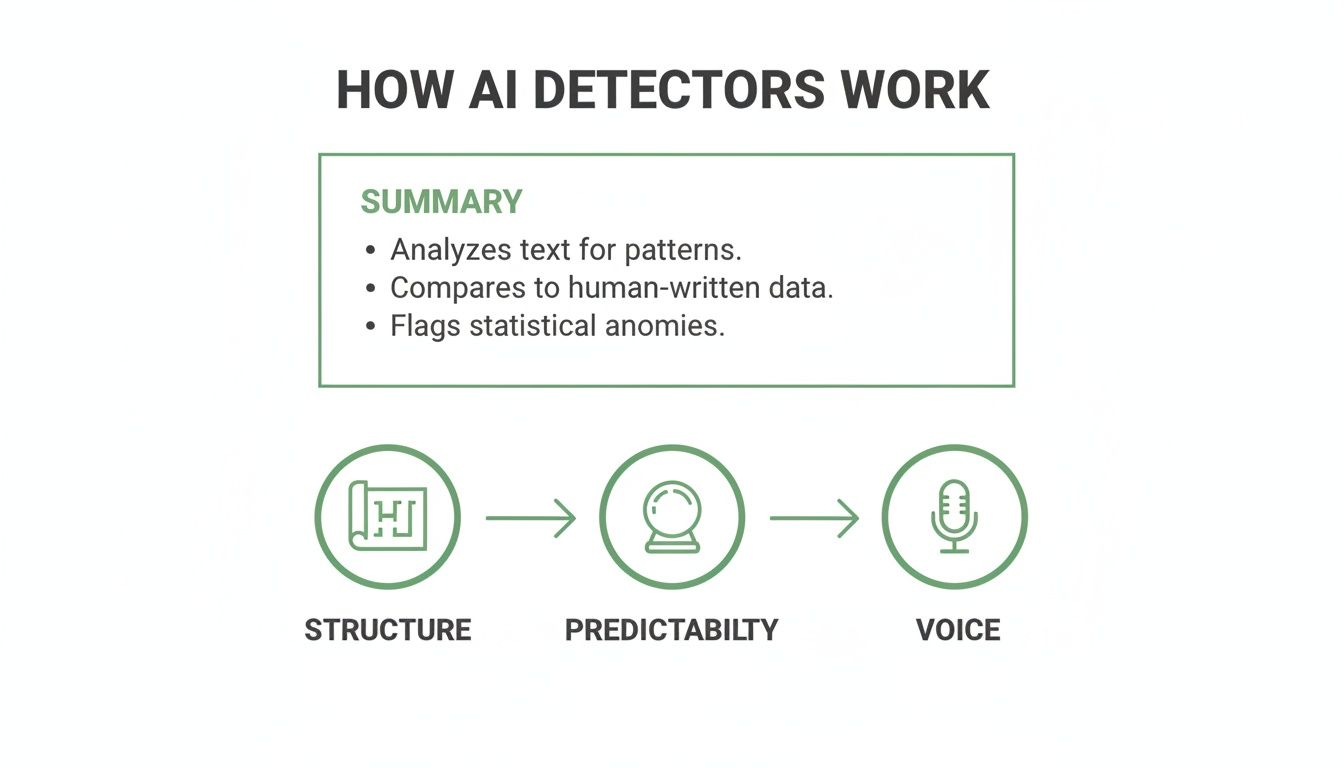
As the visual shows, it’s all about spotting those robotic patterns that human writing naturally avoids.
Comparing Top Free AI Detectors
When you’re trying to pick a free tool, you have to look past the simple percentage score it spits out. The best options give you more context and a much better overall experience. We’ve sifted through the noise to find a few standout tools that deliver solid results without asking for your credit card.
To make it easier to compare, here’s a quick breakdown of the top free AI detectors currently on the market.
| Tool Name | Detection Accuracy | Free Usage Limits | Key Feature | Best For |
|---|---|---|---|---|
| Natural Write's Free AI Checker | High | Generous, with emphasis on an integrated workflow | Built-in humanizer and a privacy-first policy (doesn't store text) | Writers who want to identify and fix AI-like text in one place. |
| GPTZero | High | 10,000 characters per scan; limited free scans per hour | Sentence-by-sentence highlighting and clear visual feedback | Quick, detailed checks of shorter texts with a focus on pinpointing specific problem areas. |
| Copyleaks | Very High | Daily free credits for checking text | Strong multi-language support and a detailed, color-coded report | Users who need to check longer documents or content in languages other than English. |
Each of these tools offers a reliable way to pre-screen your work, giving you a chance to edit and revise before it ever reaches your instructor's inbox.
Choosing The Right Tool For Your Needs
So, which one should you choose? It really comes down to your end goal. Are you just doing a quick spot-check for peace of mind, or are you looking for a tool that will actually help you become a better writer?
Key Insight: The smartest approach isn’t just to find AI-generated content. It's to use the detector's feedback as a guide to improve your own writing, making it clearer, more engaging, and more authentic.
This is where a tool like Natural Write really shines. Its workflow is designed for writers who are focused on improvement. You can check your draft, immediately see which phrases sound stiff or robotic, and then use the integrated humanizer to polish them until they reflect your own unique voice. It turns the detection process into a productive editing session.
The rise of these tools has had a massive impact. Turnitin's own data from over 200 million papers showed that 11% had at least 20% AI-generated text. Yet, even their institutional tool has a 4% false positive rate at the sentence level. This is a crucial reminder that no detector is infallible.
Ultimately, your goal should be to use these free resources responsibly—not to cheat the system, but to produce work that is genuinely your own. For a deeper dive into more options, you can explore our guide to free online AI detection tools.
A Practical Walkthrough for Checking Your Content

Alright, you know which tools are out there. But knowing how to use them effectively is a whole different ballgame. Let's walk through a simple, confident process for reviewing your own work. The real goal here isn't just to "pass" a scan—it's to use the feedback to sharpen your writing and make it undeniably yours.
Step 1: Prepare and Run Your First Check
First things first, grab the text you want to analyze. You can copy the whole document or just a few paragraphs you're unsure about. Pop it into your chosen AI checker. Most of the free ones have a straightforward text box waiting for you.
For this first pass, pick a tool you find reliable and easy to understand. Hit the "check" button and it will spit back a percentage score, which is its best guess at the likelihood of AI origin. More importantly, it will usually highlight the specific sentences it thinks are suspicious.
Step 2: Analyze the Initial Results
Okay, take a deep breath. Don't panic if you see a high AI score. That number is just a starting point, not a final verdict. The real gold is in the highlighted text—this is where the tool is telling you, "Hey, this part sounds a little robotic or predictable."
This visual feedback is your revision roadmap. It points you directly to the spots in your writing that might be missing a human touch. These are the areas you’ll want to focus on first.
Step 3: Cross-Reference with a Second Tool
Here’s a pro tip: never rely on just one detector. Why? Because no single tool is perfect. Getting a second opinion is your best defense against false positives, which is when perfectly human writing gets mistakenly flagged as AI-generated.
So, copy your text and run it through a different free AI checker. If both tools flag the same sentences, that's a strong signal that those passages probably need some work. If the results are wildly different, it just shows how subjective these detectors can be and suggests the flagged content is borderline. You can dive deeper into these nuances in our guide on how to detect AI content.
Key Takeaway: Using a second tool isn't about chasing the "right" score. It's about finding a pattern. When multiple tools point to the same problem areas, you know exactly where to direct your editing efforts to improve clarity and authenticity.
Step 4: Make Smart and Ethical Revisions
This last step is where the magic happens. Look closely at the highlighted sections and ask yourself a few questions:
- Is the sentence structure getting a bit repetitive?
- Does the vocabulary sound overly formal or a bit generic?
- Is my own personal voice getting lost in this section?
Now, rewrite those sentences. The goal isn't just to trick a machine, but to inject your unique perspective and style back into the writing. This process does more than just lower an AI score; it fundamentally improves the quality, originality, and impact of your work, making sure the final piece is genuinely, authentically you.
Using AI Writing Tools Ethically and Effectively
When you start using AI writing tools, you need a clear game plan. Let's be honest, there's a huge difference between outright cheating—like turning in an essay a machine wrote from scratch—and using AI as a super-smart assistant. Getting that distinction right is the key to using these tools without crossing an ethical line.
Think of it this way: AI isn't your ghostwriter. It's your brainstorming buddy. It can be fantastic for getting past writer's block, helping you structure your first messy thoughts, or offering a few different ways to phrase something when you’re stuck. But your own critical thinking has to be the engine driving the whole process.
Finding the Ethical Middle Ground
The most responsible way to approach AI is as a tool to help you work, not to do the work for you. You're in the driver's seat from beginning to end. You come up with the original ideas, you steer the research, and you have the final say on every single word.
As you explore these tools, you'll see that understanding the world of content creation automation powered by AI is a big part of using them responsibly. They are built to make things faster, but the real intellectual work—the thinking—has to stay with you.
The Ethical Framework: The line is crossed when you outsource the thinking. Using AI to double-check your grammar is fine. Using it to come up with a core argument or an entire analysis without your own intellectual effort? That's where you get into trouble.
This mindset ensures you're just making your own work better, not handing it off to a machine.
Using Tools Like Natural Write as an Editing Partner
This is where a different kind of tool comes in handy—one built for refining your work, not just generating it. Instead of just plugging your text into a Turnitin AI detector free alternative to see a score, you can use platforms that help you actively improve your writing. A service like Natural Write, for instance, is designed to be a sophisticated editing partner, not a way to "beat the system."
It’s built for a very specific, ethical job: to polish a draft that is already yours.
- Refining Tone: You can take a paragraph that sounds a bit stiff or robotic and tweak it to match your own voice.
- Fixing Awkward Phrasing: The tool can pinpoint and help you smooth out clunky sentences—the kind AI often spits out—making your writing clearer and easier to read.
- Enhancing Original Ideas: By cleaning up the language and improving the flow, you make sure your unique arguments shine through, making them even more powerful.
This is all about giving you more control. It's about using technology to express your own ideas with more clarity and impact. At the end of the day, the goal is to create something polished, authentic, and undeniably yours.
Your Path to Confident and Authentic Writing
So, let's pull all of this together.
Your hunt for a "Turnitin AI detector free" tool might have hit a dead end, since it's a premium feature for institutions. But what you've gained instead is a much more robust strategy for making sure your writing is undeniably yours and polished to a shine.
This is about more than just trying to "pass a check." Now that you understand how these detectors work—looking for predictable patterns and robotic rhythms—you know how to use the free alternatives smartly. You can run an initial scan, compare the results from a couple of tools to get a better signal, and most importantly, use their feedback as a roadmap for revision.
Adopting a Smarter Writing Process
The real secret to writing with confidence isn't about finding some magic tool that gives you a green light. It’s about building a better workflow that puts you in the driver's seat. This is how you produce high-quality, original work that you can stand behind with pride.
Here’s what that modern writing path looks like:
- AI as Your Brainstorming Buddy: Use generative AI to kickstart ideas, build an outline, or get past a nasty case of writer's block. Just don't let it write the final draft for you.
- Checkers as Your Guideposts: Run your early drafts through a couple of reliable free checkers. Their job is to flag any sections that sound stiff, generic, or just a little too perfect.
- Humanizers as Your Final Polish: This is where you bring it home. Use an ethical editing aid like Natural Write to smooth out clunky phrasing, refine your tone, and make sure your unique voice is front and center.
Think of it this way: this process turns detection tools from scary gatekeepers into helpful editing partners. They're just instruments that help you spot the weak points, sharpen your prose, and ensure the final piece is clear, compelling, and genuinely you.
Ultimately, this approach does more than just get a single assignment ready for submission. It helps you grow into a more skilled and adaptable writer—someone who can blend the raw power of AI with the irreplaceable spark of human creativity. You’re in full control, ready to create work that meets the highest standards of integrity.
Frequently Asked Questions
Got a few lingering questions about AI detection? Let's clear up some of the most common ones people ask.
Can a Free Tool Guarantee a 100 Percent Human Score?
In a word, no. No AI detector on the market, free or paid, can promise 100% accuracy. That’s because these tools are built on pattern recognition and statistical probabilities, not absolute certainty. There's always a margin for error, which means false positives (when your own human writing gets flagged as AI) can and do happen.
The smartest way to use these tools is to run your text through a primary checker you trust, then get a second opinion from another one. The real goal isn't to chase a perfect score. It's to use the feedback to spot passages that sound a bit robotic or don't quite capture your unique voice, then revise them.
Is Using an AI Humanizer Considered Cheating?
When you use it as an editing tool, it’s absolutely not cheating. Think of it less like a magic wand and more like a sophisticated grammar checker or a collaboration with a human editor. If you're using it to polish the clarity, tone, and flow of an AI-assisted draft that’s built on your own ideas, you’re just using a tool to improve your work.
It only crosses the line into academic dishonesty when it's used to mask authorship—like submitting an essay that was entirely generated by AI. The key difference is whether you're enhancing your own work or trying to pass off someone else's (or something else's) as your own.
Key Insight: It all comes down to intent. Using a humanizer to refine and polish your own ideas is just smart editing. Using it to take credit for ideas and text you didn't create is academic misconduct.
Why Do Different AI Checkers Give Different Results?
You'll quickly notice that one tool might give you a 50% AI score while another says 80% for the very same text. This happens because every AI detector is powered by a different algorithm, trained on a different dataset.
One model might be highly sensitive to repetitive sentence structures, while another is better at spotting predictable word choices. This is exactly why getting that second opinion is so valuable. If two or three completely different tools all flag the same few sentences, that's a huge clue that those specific spots need a human touch to sound more original and natural.
Ready to check your work with confidence and polish it to perfection? Natural Write offers a free, privacy-focused AI detector and a powerful humanizer to help you refine your writing. Try our tools today at https://naturalwrite.com.